

Description
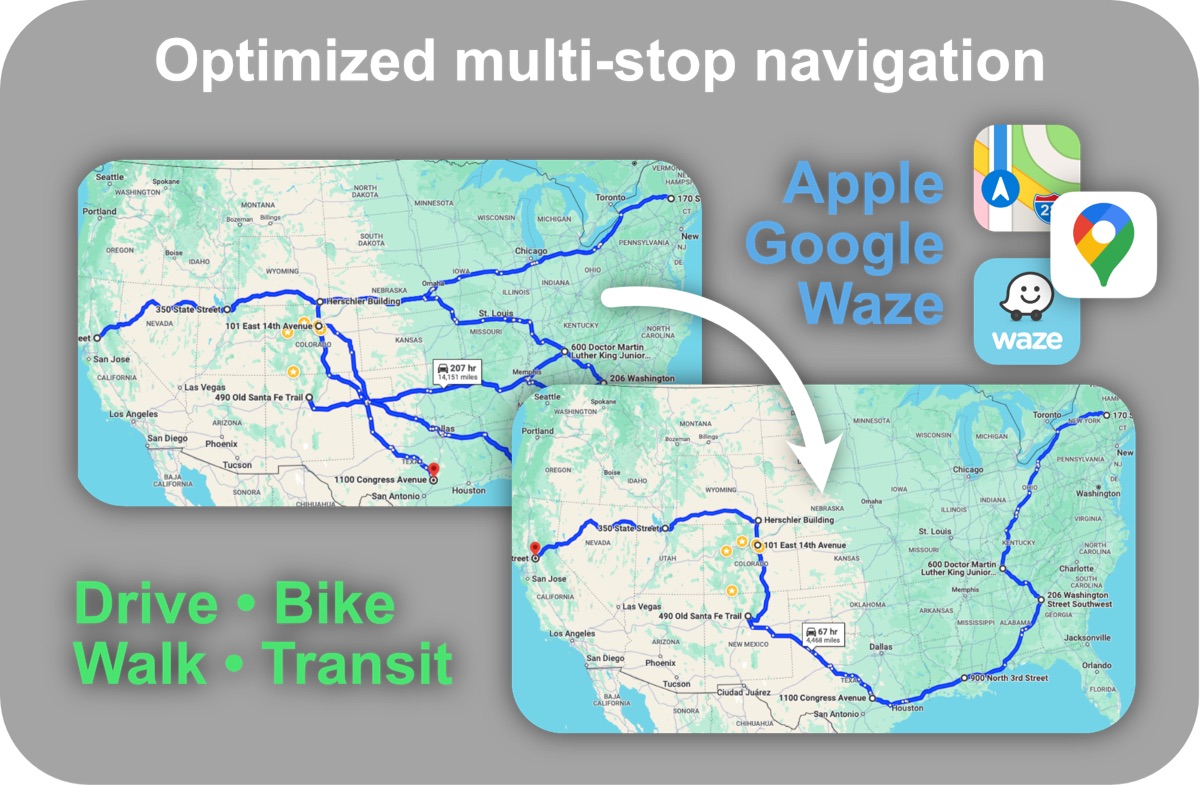
### Navigate multiple destinations in the fastest/shortest order
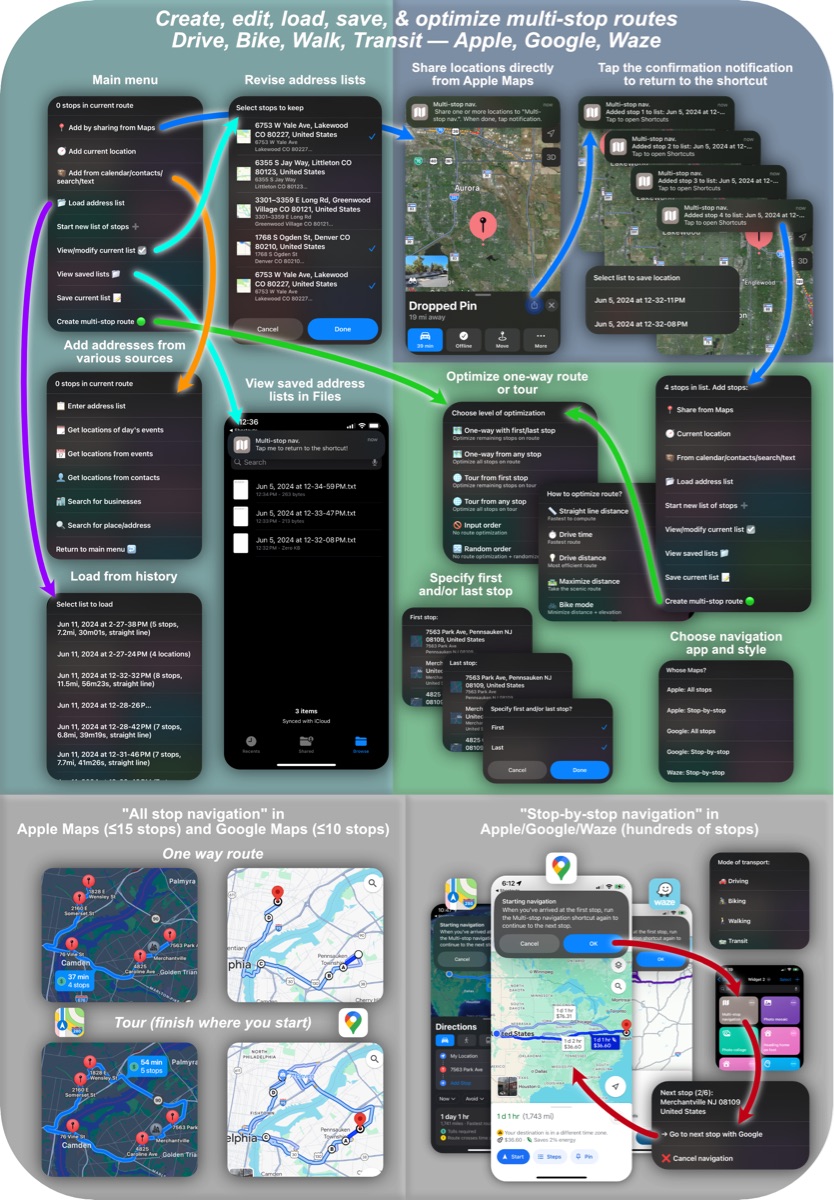
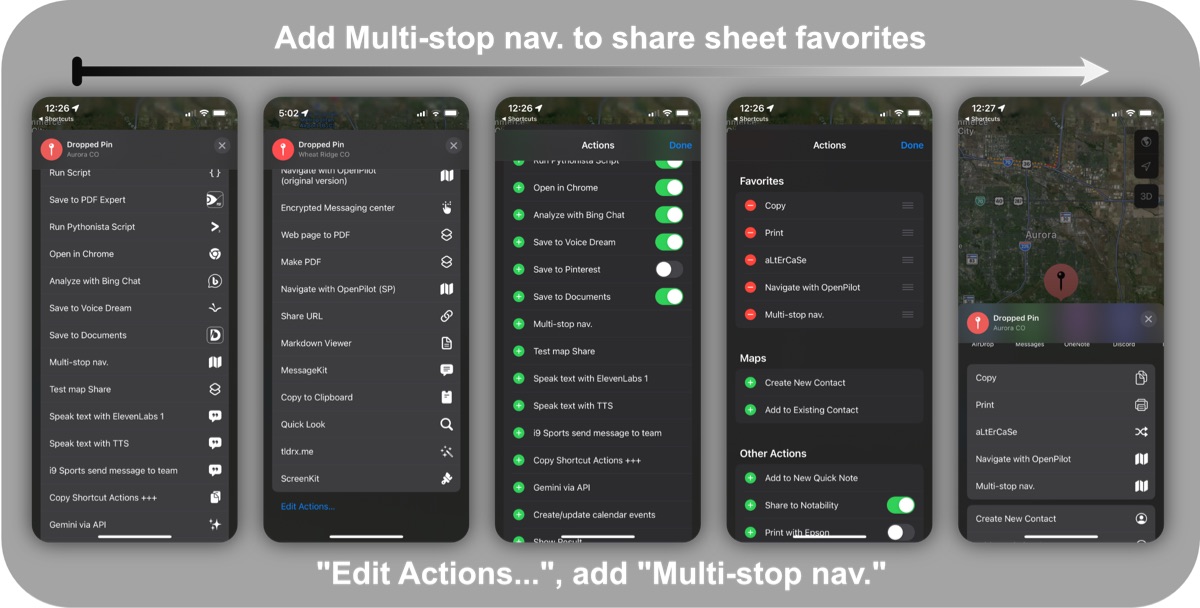
Specify three or more locations and this Shortcut will compute the optimal ordering of stops. Can specify locations from several different sources, including direct sharing of locations from Apple Maps (no sharing from Google Maps yet).
-----
#### Navigate:
- Showing all stops in a single route ("All stops") with
- Apple Maps
- Google Maps
- One stop at a time ("Stop-by-stop") with
- Apple Maps (Drive/Bike/Walk/Transit)
- Google Maps (Drive/Bike/Walk/Transit)
- Waze (Driving only)
#### You can specify how to optimize:
- for travel time,
- travel distance,
- straight line distance,
- scenic route (maximize distance, because why not?), or
- bike mode (optimize for distance and elevation gain).
The straight line distance, scenic route, and bike mode optimization runs faster because they use location coordinates, while travel time/distance takes a few seconds to compute driving times/distances using maps. You can also retain the input order of the route if desired.
Bike mode will optimize for distance and elevation change, favoring downhill over uphill. This doesn't take into account the actual path you ride; only the locations and elevations of each stop on the route.
You can also specify first and/or last stop.
Then you can open the route in Apple Maps, Google Maps, or Waze depending on transportation mode and whether “stop-by-stop” or “all-stops” mode is used.
#### Specify map app, route type, optimization type during shortcut setup (or at top of shortcut)
- By specifying these things, you can streamline the shortcut by reducing the number of taps necessary when running the shortcut.
- Note that, depending on how you configure the shortcut, it may no longer work on macOS (for example, if you specify Waze as the default map app)
## Run from another program
This shortcut takes an address list as optional text input, which allows you to run it from another shortcut or using an x-callback URL.
##### Use from another shortcut
You can use a “Run shortcut” action and specify an address list as input, one complete address per line, as in [this example shortcut](https://www.icloud.com/shortcuts/f1b045ef385e496c941fc1fc3c34f64c)
##### Use with an x-callback URL
URL-encode an address list, one complete address per line, and shortcut name in order to [build an x-callback URL](https://support.apple.com/guide/shortcuts/use-x-callback-url-apdcd7f20a6f/ios) that launches the shortcut with your address list as input. [This example shortcut](https://www.icloud.com/shortcuts/c2ecaae15f064f1bba91fa2f4e186e99) shows how this can work, but **you can do this from a web app or from anywhere else on iOS/iPadOS**.
-----
## Thanks for your support
This is similar to what [RoadWarrior](https://apps.apple.com/us/app/roadwarrior-route-planner/id959621658) and other routing apps do, but you get it for free as a vanilla shortcut instead of a $100/yr subscription. If you want to show your appreciation, here's my [Patreon](https://www.patreon.com/twilsonco), or you can [buy me a coffee](https://buymeacoffee.com/twilsonco)!
-----
## Want an app instead?
| Name | Price |
|------|-------|
| [Route Planner, Delivery, MyWay](https://apps.apple.com/us/app/route-planner-delivery-myway/id1557014712) | $10/mo or $80/yr |
| [Circuit Route Planner](https://apps.apple.com/us/app/circuit-route-planner/id1198232244) | $20/mo or $120/yr |
| [Route4Me Route Planner](https://apps.apple.com/us/app/route4me-route-planner/id349853799) | $10/mo or $80/yr |
| [Badger Maps: #1 Route Planner](https://apps.apple.com/us/app/badger-maps-1-route-planner/id789934914) | $60/mo |
| [PlaceMaker Route Planner](https://apps.apple.com/us/app/placemaker-route-planner/id951375734) | $5/mo or $45/yr for up to 25 stops $10/mo or $90/yr for 150 stops |
| [MyRoute: Multi-Stop Navigation](https://apps.apple.com/us/app/myroute-multi-stop-navigation/id1035133988) | $24 for 50 address credits |
| [Road Warrior Route Planner](https://apps.apple.com/us/app/roadwarrior-route-planner/id959621658) | $15/mo or $100/yr |
## Acknowledgements
- Thanks to [open-elevation.com](https://open-elevation.com) for elevation lookup data. Please donate if you end up using this a lot!
- Thanks to u/Shoculad for the suggestion of how to improve UI by allowing sharing locations from Apple Maps!
- Thanks to [@atnbueno](https://routinehub.co/search/?q=js1) for the inspiration on how to use JavaScript for the number crunching, leading to a speedup of more than 3,600X!
Screenshots
Information
Version:
1.11.1
Released:
Last Updated:
Comments
1 comment
G
T
Can you elaborate? It's working with Google Maps as expected on my iOS 26 iPhone 13, and was working on iOS 18 before updating.







Please sign in to post comments.