

Description
**Create 3d video from side-scrolling video, and convert between cross/parallel view image/video**
## What is it
- There are two ways to view a 3d left/right image, parallel or cross-eyed. [Here's a nice explanation of the two](https://triaxes.com/docs/3DTheory-en/522ParallelCrosseyedviewingmetho.html).
- And here's some reddit communities with [parallel view](https://www.reddit.com/r/ParallelView/) and [cross view](https://www.reddit.com/r/CrossView/) 3d images and videos
- This shortcut lets you convert an image or video designed for one method into one designed for the other.
- You can also create such a 3d video from a non-3d video that is side-scrolling, such as when you take a *relatively stable* video when looking out the side of an airplane or vehicle.
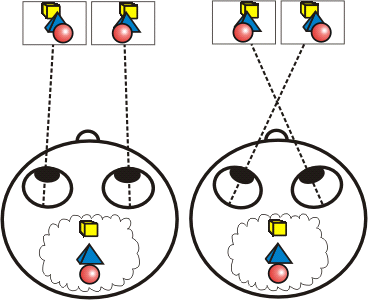
Figure taken from the link above. Parallel-eyed view is depicted on the left, and cross-eyed view on the right.
## Examples
- Flying over the Burnt Canyon area of the Grand Canyon, United States (Apple Aerial video)
- [Parallel view](https://www.reddit.com/r/ParallelView/comments/1j7m2oa/flying_over_the_burnt_canyon_area_of_the_grand/) / [Cross view](https://www.reddit.com/r/CrossView/comments/1j7m5gk/flying_over_the_burnt_canyon_area_of_the_grand/)
- Over Victoria Harbour facing Hong Kong Island
- [Parallel view](https://www.reddit.com/r/ParallelView/comments/1j6po71/over_victoria_harbour_facing_hong_kong_island/) / [Cross view](https://www.reddit.com/r/CrossView/comments/1j6prfu/over_victoria_harbour_facing_hong_kong_island/)
- Flying over Dubai Marina in the United Arab Emirates (Apple Aerial video)
- [Parallel view](https://www.reddit.com/r/ParallelView/comments/1j4ygmf/flying_over_dubai_marina_in_the_united_arab/) / [Cross view](https://www.reddit.com/r/CrossView/comments/1j4yps7/flying_over_dubai_marina_in_the_united_arab/)
## Requirements
- Needs the free a-Shell mini app
- On macOS, can use a local install of ffmpeg
- Advantages include faster processing, smaller output file size (especially for high-resolution video), no need to grant permission to send files to A-Shell Mini, and Shortcuts doesn't need to open in order to complete processing.
- Install with [homebrew](https://brew.sh) using `brew install ffmpeg`
- Once installed, specify install location at top of shortcut; can see the correct path by running `which ffmpeg` in Terminal
## How to use
### Create 3d video from side-scrolling video ("cha-cha" method)
This mode uses a time delay between the left and right halves of the resulting video in order to create a 3d effect. This is essentially applying [the "cha-cha" technique, which can be used to create 3d images with a single lens](https://stereoscopy.blog/2022/03/04/stereoscopic-3d-photography-with-a-single-lens/).
1. Starting with a side-scrolling video, such as one looking out the window of a plane or vehicle, selected from photo library or from files if on macOS
2. Optionally trim the video to what you want to appear in the 3d version
3. Set options:
- Specify whether video scrolls to right or left
- Cross or parallel 3d view
- Time delay between left and right halves (in seconds)
- Fraction of left/right image width to trim off for better left/right image border alignment
- Gap between left and right halves (in pixels) to make it easier to look at
- Output video speed, if you want to slow it down or speed it up
**Output 3d video will be saved to your recents album in Photos (or if macOS and you selected input from files, you can select where to save output) and opened in quick-look**
## Acknowledgments
Thanks to [@gluebyte](https://routinehub.co/user/gluebyte) for the inspiration to use ffmpeg inside a-Shell mini. Makes it about 50x faster than the vanilla shortcuts method I had used initially.
Information
Version:
1.9
Actions:
262
Released:
Last Updated:
Apps:

Comments
Start the conversation
No comments yet. Be the first to comment!









Please sign in to post comments.