


Changelog
v2.1
Description
**_A simple, yet full fledged icon creator._**
_For iOS & macOS._
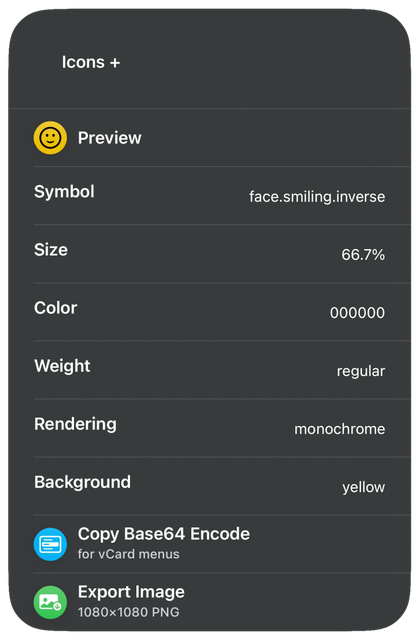
### Overview:
* **Preview**: A real-time preview of your icon design right in the main menu.
* _Tapping expands to full size_
* **Symbol**: Choose from 6900+ SF Symbols with easy access to a reference list.
* **Size**: Easily adjust the symbol’s size.
* **Color**: Color the symbol using the device's color picker.
* **Weight**: Customize the symbol’s boldness from 9 increments.
* **Rendering**: Modify the symbol’s color palette.
* **Background**:
* _Solid color from the device color picker_
* _Any of the 15 Shortcuts colors + iOS 18 dark mode icon_
* _Your own image_
* _None (SF Symbol only)_
* **Copy Base64 Encode**: Copy your icon encoded in Base64 for use in vCard menus.
* **Export**: Export your icon as a high-quality 1080x1080 PNG image via:
* _Photos_
* _Files / Finder_
* _Share Sheet_
* * *
#### Other Features:
* Your **settings** and custom backgrounds **are saved** in between sessions.
* The data location is easily changed.
* Fully functional **offline**.
* **Minimal setup** and permissions.
* * *
##### Notes:
* _The Actions app is required._
* _"Allow Sharing Large Amounts of Data" must be enabled in Shortcuts' settings (no data ever leaves your device)._
* _You must keep the shortcut's name as "Icons +" in order to use color pickers._
* * *
**This Shortcut was built from [@gluebyte](https://routinehub.co/user/gluebyte)’s “[SF Symbols to Image](https://routinehub.co/shortcut/19080/)” (v1.2, July 20 2024).**
* * *
Information
Version:
2.1
Released:
Last Updated:
Apps:

Comments
Start the conversation
No comments yet. Be the first to comment!











Please sign in to post comments.